DAY 3: Pirates Training Bootcamp
A pirate has to understand what value means and how to preserve it.
1. Introductory unplugged activity
Find precious goods (inspired by RTP Secret Mission)
The captain asks the crew to bring back precious goods but does not tell exactly what he is looking for.
He rejects or accepts objects based on a certain pattern the crew members have to discover.
Examples of pattern:
- Things of red / blue
- Things of wood / metal / rocks
- Things light / heavyig, big / small
- Worked by men or not, artificial / natural
Create a small competition: The first who finds the Pattern wins Points
Feed back of tests with KCJ team (20-06-2018):
+ Good feedback of the game. We will need to make a hughe pile of random items
+ Consider inlcude natural elements in the selection
+ Create a special place where old pirates deliver final decisions
2. Microbit activity
Prepare the MicroBit for tilt detection based on the roll signal
We have 1000 coins and each time we tilt too much we lose either 1 or 10 coins. See how many coins are left in the coffin once the race end!
+ TODAY WE LEARN:
1. What is tilt? ( angles )
2. How can we relate tilt and sound?
3. What is a conditional in code?
4. What is a variable in code?
5. How can we create a coins counter?
6. Play with the tilt programs and see how affects the sound.
2.1 Blocks Code
2.1.1 Introduction to tilt sensor with conditionnals
Step 1: Make different sounds depending on the tilt
*** PLEASE ADD THE DEMO CODE FOR THE INTRODUCTION TO TILT SENSOR (microbit-gyro-absolute-drop-count.hex in ./Makecode/Final/day3)***
2.1.2 Countinous dropped coins counter
The code used for the game is a continous version of the code show as an introduction. It makes the interval between coin drops proportionnal to
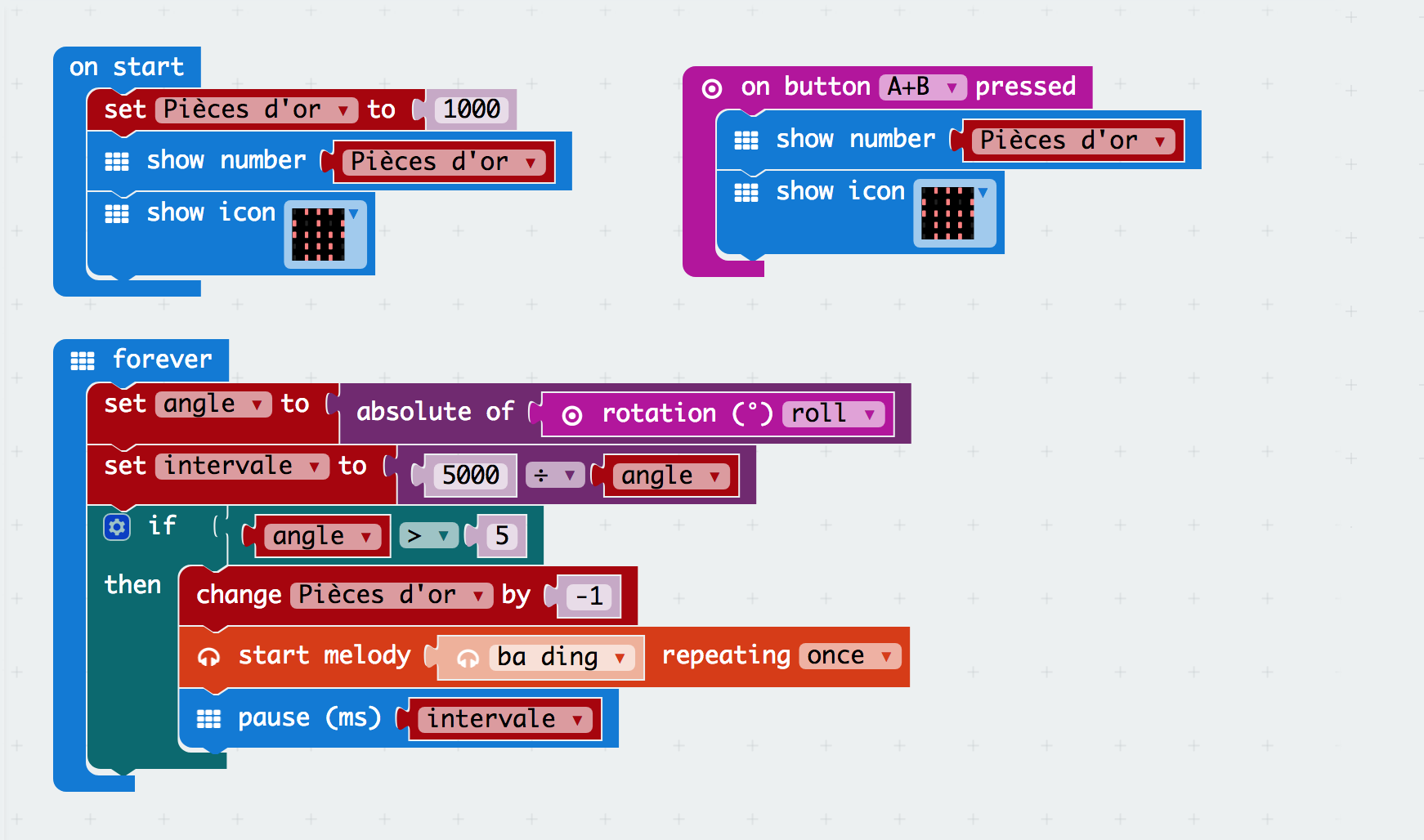
2.2 Text Code
let intervale = 0
let angle = 0
let Pièces_dor = 0
input.onButtonPressed(Button.AB, () => {
    basic.showNumber(Pièces_dor)
    basic.showIcon(IconNames.Skull)
})
Pièces_dor = 1000
basic.showNumber(Pièces_dor)
basic.showIcon(IconNames.Skull)
basic.forever(() => {
    angle = Math.abs(input.rotation(Rotation.Roll))
    intervale = 5000 / angle
    if (angle > 5) {
        Pièces_dor += -1
        music.beginMelody(music.builtInMelody(Melodies.BaDing), MelodyOptions.Once)
        basic.pause(intervale)
    }
})
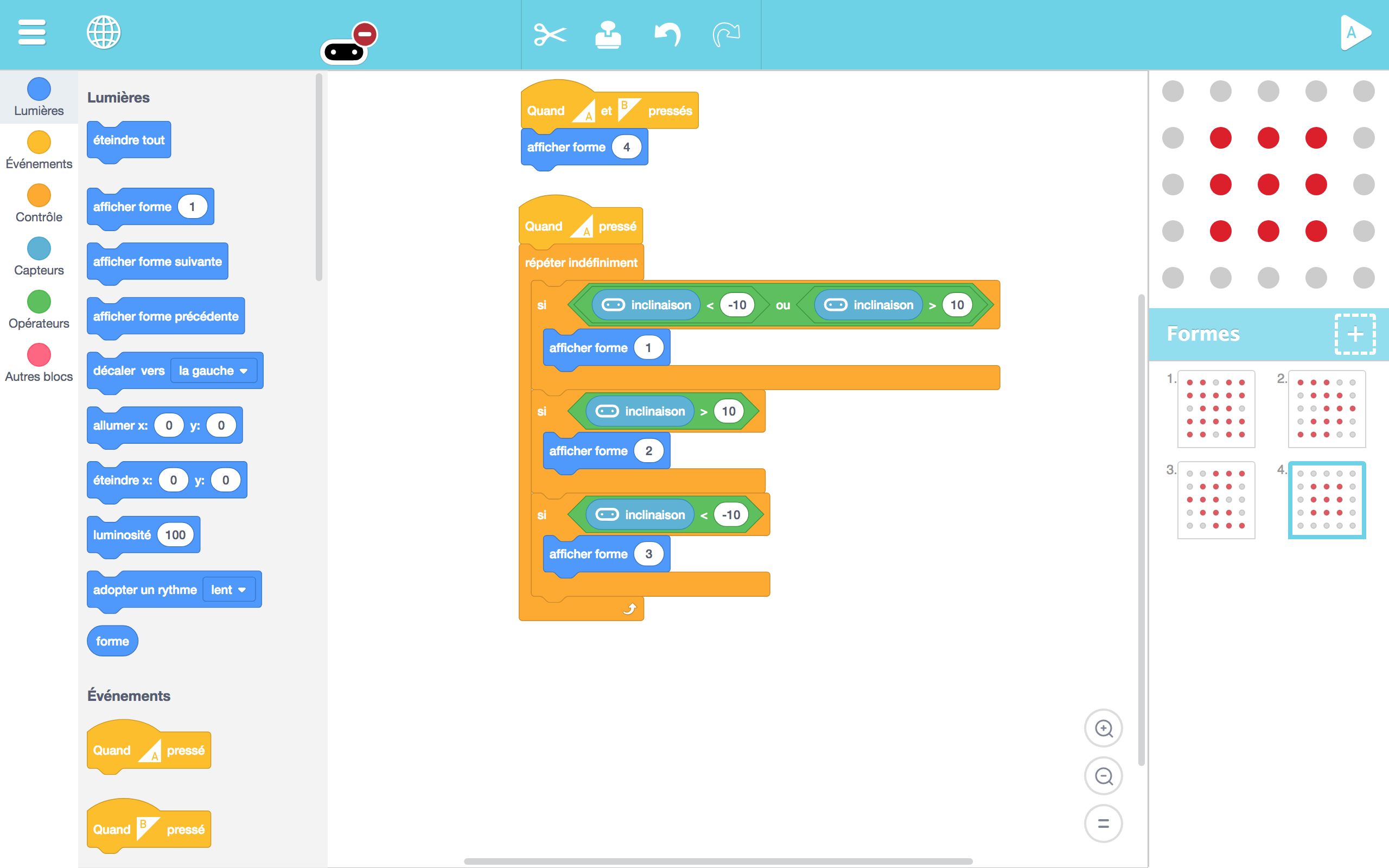
2b. Artbit - begginers - tilt sensor
+ TODAY WE LEARN:
1. What is tilt? ( angles )
2. How can we relate tilt and an image?
3. Play with the tilt program and see how affects the pixel art image.
- Create their own Tilt animation in Artbit.
3. Proper treasure handling
Items in a treasure are often very fragile. The crew members have to write a microbit program to detect if a treasure item has been miss-handled using the gyroscope readings. They pratice extreme treasure handling in a obstacle course.
- We create 1 progam that controls the sound interval and number of coins based on tilt.
- The Sound program emits two different sounds to tell how extreme your tilt is
- A great and difficult obstacle race is created where the participants have to move, jump, go up and down at a good speed until reach the end.
- At the end of the race we see which participants conserve more coins in a linited amount of time.
Feed back of tests with KCJ team (20-06-2018):
- We originally coded with separation of concerns. We saw that the code had to be unified.
+ Now it's such a beautiful unified piece of code!
4. Conclusions
Young kids (age 5 to 8)
- Unplugged Activities
We end up drawing a treasure chest directly so they could enter easily to the game.
OBSERVATION: Drawing plays such an important role for this age group. It prepares the minds for abstract thinking so it is easier to have them code afterward. Unplugged activities foocusing on computational thinking through drawing and arts and crafts could be a very interesting improvement for this age group.
- Coding
We tried to introduce the concept of tilt so they could understand how the game they were going to play worked. This first concept to angles and the day before to what is a magnet was leading to most of them to their first contact with science at such an early age. We introduced conditionnal statements and the tilt sensor blocks in Artbit to created a ship that was tangling from side to side as you moved the Microbit. Older kids (7 - 8 years old) were able to do it, but young kids had troubles, they continued working on their animations.
- Taking the code out
This game was a total success. The fact that they were all involved in the activity was very inportant. We ended up subdividing each of the teams in different pairs. They had to run with the treasure chest and pass the chest from couple to couple until they reached the end. Finally they count how much coins were left in the chest. Thanks to the sturdy chests we built the microbits could survive to such level of stress. This was a real bootcamp for the whole gear.
OBSERVATIONS: To do these activities we had to build enclosers for the Microbits that included an ON/OFF switch and an INPUT audio jack. Also we used a small sound system to amplify the sound.
Older kids (age 8 to 12)
- Unplugged Activities
The pattern recognition game worked well with the older kids to get the day starting. It was fun. The game lasted about 15 to 20 minutes.
- Coding
We had the opportunity to start explaining what pitch and roll are, how they can be detected through the internal gyroscope of the microbit. We used to tilt to create different sounds depending on the tilt angle. It was a very fun class where they used variables, conditionals and some physics. A great combo!
- Taking the code out
This game was a total success. The fact that they were all involved in the activity was very inportant. We ended up subdividing each of the teams in different pairs. They had to run with the treasure chest and pass the chest from couple to couple until they reached the end. Finnally they countd how much coins were left in the chest. Thanks to the sturdy chests we built the microbits could survive to such level of stress. This was a real bootcamp for the whole gear.
OBSERVATIONS: To do these activities we had to build enclosers for the Microbits that included an ON/OFF switch and an INPUT audio jack. Also we used a small sound system to amplify the sound.
Authors: B.Ferragut and D.Banville - June 2018
© 2012 - 2018 Kids Code Jeunesse | All Right Reserved